gcp-ace-simulator
A timed Google Cloud Associate Cloud Engineer exam on your own machine, and a free theory course, both on the June 2026 exam guide.





Google replaced the Associate Cloud Engineer guide on 30 June 2026: four sections instead of five, weighted 20 / 30 / 30 / 20, with new objectives such as Workforce Identity Federation, Cloud NGFW with secure tags, GPUs vs TPUs and AI-assisted tooling. This project is built on the new one.
This project has three parts:
- A theory course that teaches every bullet of the new guide, in dependency order, with a recall card per part. It is a website: nothing to install.
- A question bank of 591 items. Each one names the guide section, objective and subtopic it tests, explains all four options, and links to the documentation behind the answer.
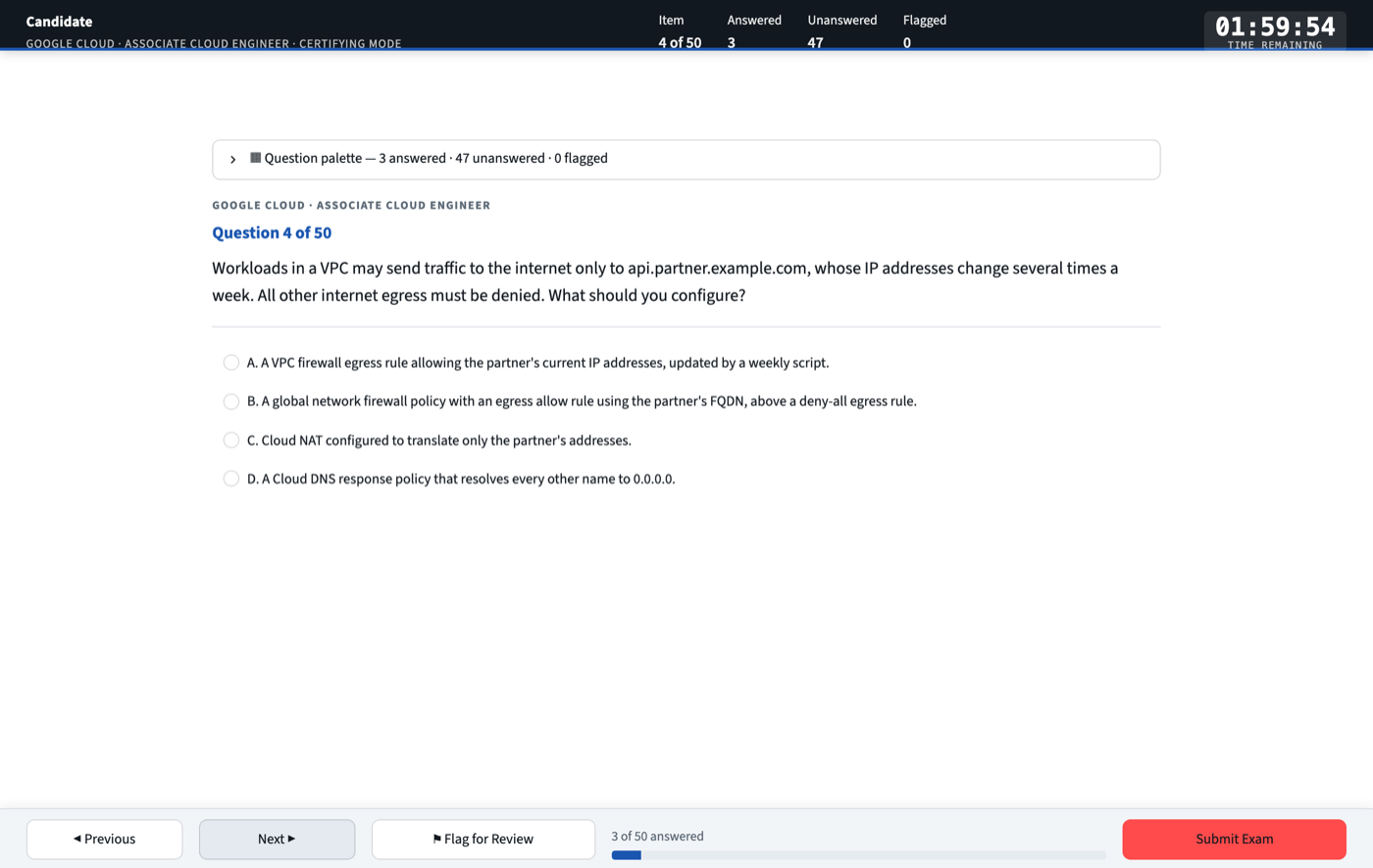
- An exam shell that imitates the delivery window: 50 questions sampled at the guide’s weights, 120 minutes, a question palette, deferred grading, and a PDF score report broken down by objective.
Everything runs locally and all state is plain JSON on disk. No account, no telemetry, no API key.
Not affiliated with, endorsed by, or sponsored by Google LLC. “Google Cloud” and “Associate Cloud Engineer” are trademarks of Google LLC. This is independent study material, not built from real exam questions (how the bank is written). A score here predicts nothing certain about the exam.
1 · Start
With Docker
You need Docker with Compose, and nothing else: no Python and no account.
git clone https://github.com/nirmata78/gcp-ace-simulator.git
cd gcp-ace-simulator
docker compose up                                    # http://localhost:8501
Press Ctrl+C to stop it, or use docker compose up -d and docker compose down to run it in the background. After the
first build it starts in seconds and needs no internet connection. Using it with Docker covers
your data, updates and uninstalling.
With Python
Use this to contribute, or to write questions with Claude. You need Python 3.11 or newer.
git clone https://github.com/nirmata78/gcp-ace-simulator.git
cd gcp-ace-simulator
python3 -m venv .venv && source .venv/bin/activate
pip install -r requirements.txt
streamlit run app.py                                 # http://localhost:8501
The exam needs no internet connection, and only kb.py add --topic and --stem do. ACE_SKIP_NETWORK_CHECK, which
older versions needed for offline study, is still accepted and does nothing.
The intended loop:
- Read a part of the theory.
- Drill it in Learning mode, filtered to that part’s objectives.
- Sit a Certifying exam, and reread the parts where you scored under 70%.
Using it with Docker
Where your data lives. Your history and PDF reports are in a Docker volume called ace-state, not in the image or
this folder. They survive stopping, removing and rebuilding the container.
docker compose down -vdeletes that volume, and your history with it. Plaindocker compose downkeeps it.
An exam you’re still sitting is held in memory, so it’s lost if the container stops. Download reports from the results
page. These commands all use the image that docker compose up built, so run that once first:
IMAGE=ghcr.io/nirmata78/gcp-ace-simulator:local

# Back up your history and reports to a file in this folder
docker run --rm -v ace-state:/state "$IMAGE" tar -C /state -cf - . > ace-state-backup.tar

# Restore them, overwriting files with the same name
docker run --rm -i -v ace-state:/state "$IMAGE" tar -C /state -xf - < ace-state-backup.tar

# Move in the history from a Python install, replacing any history already in the volume
docker run --rm -i -v ace-state:/state "$IMAGE" sh -c 'cat > /state/history.json' < data/history.json
| To | Do this |
|---|---|
| Use another port | ACE_PORT=8600 docker compose up, then open http://localhost:8600 |
| Update | git pull, then docker compose up --build. Your history stays |
| Query the bank | docker compose exec simulator python scripts/kb.py stats, while it’s running. The read-only kb.py commands work |
| Uninstall | docker compose down -v, which also deletes your history, then docker rmi ghcr.io/nirmata78/gcp-ace-simulator:local, then delete this folder |
How it’s locked down. The container runs as a non-root user on a read-only filesystem with no extra Linux
capabilities, and its port is published to 127.0.0.1 only, because the app has no login. Don’t publish it to your
network. The image holds only the app and the question bank: .dockerignore denies everything else, so your history,
reports and private/ can’t get into it. It has no anthropic package, so writing questions with Claude needs the
Python install.
Keeping state outside the image is one setting, ACE_STATE_DIR. It also works with Python: history then goes to
$ACE_STATE_DIR/history.json and reports to $ACE_STATE_DIR/reports/. Without it they stay in data/history.json and
reports/.
2 · Two modes
Certifying
- Timing. 50 questions and 120 minutes, both adjustable. Grading is deferred until you submit. When the timer reaches zero the exam submits itself and is marked time expired.
- Sampling at three levels, each by largest-remainder apportionment, so the counts are exact:
- sections at the published weights (10 / 15 / 15 / 10);
- objectives in proportion to their bullet counts;
- subtopics round-robin, so a 50-item draw covers about 45 distinct subtopics.
- Unseen questions first. Questions from earlier attempts are drawn only after the unseen ones in each objective run out, so repeated attempts measure knowledge rather than memory of the items.
- No topic hints. As in the real delivery window, the item’s topic is not shown while you sit.
Learning
Untimed. Filter by section, objective and subtopic, or tick Only topics introduced by the June 2026 guide. Check answer reveals the verdict, the analysis of all four options, the command and the documentation link.
3 · The blueprint
src/blueprint.py is the one place the exam structure is written down, transcribed from
Google’s exam guide.
| Section | Weight | Items per 50 | Objectives |
|---|---|---|---|
| 1 · Setting up a cloud solution environment | ~20% | 10 | 1.1 projects and accounts · 1.2 billing |
| 2 · Planning and implementing a cloud solution | ~30% | 15 | 2.1 compute · 2.2 storage and data · 2.3 networking · 2.4 tooling |
| 3 · Ensuring the successful operation of a cloud solution | ~30% | 15 | 3.1 compute · 3.2 storage and data · 3.3 networking · 3.4 monitoring and logging |
| 4 · Configuring access and security | ~20% | 10 | 4.1 IAM · 4.2 service accounts |
Below the objectives sit the guide’s 94 bullets, 24 of them new in June 2026, and a closed list of 87 subtopics. A question must use one of those subtopics, so anything the guide does not test cannot enter the bank: validation rejects it on load. Every bullet has at least three questions, and 242 questions sit on bullets the June 2026 guide introduced.
The bank holds 90 / 220 / 212 / 69 questions by section. That is not the exam’s split, and it does not need to be: the sampler draws by the published weights.
4 · Working with the bank
python scripts/kb.py blueprint              # every guide bullet and how many questions teach it (★ = new)
python scripts/kb.py topics --section 3     # objectives and subtopics with counts
python scripts/kb.py list --objective 2.3   # titles for one objective
python scripts/kb.py list --new -v          # only bullets new in June 2026, with summaries
python scripts/kb.py show ace-s2-015        # one question in full (by id or title fragment)
python scripts/kb.py search "secure tag"    # titles, stems, subtopics, tags
python scripts/kb.py stats                  # counts by section/objective, answer-letter spread
python scripts/kb.py check                  # schema, duplicates, per-objective depth, uncovered bullets
Adding questions
Give an objective and a subtopic from the closed list; the section is derived from the objective.
{
  "title": "Secure tags need the firewall purpose",
  "objective": "2.3",
  "subtopic": "Secure Tags and Service Accounts in Rules",
  "summary": "Only tag keys created with the GCE_FIREWALL purpose can be used in firewall policy rules.",
  "tags": ["secure-tags", "cloud-ngfw"],
  "question": "…",
  "options": { "A": "…", "B": "…", "C": "…", "D": "…" },
  "correct_answer": "B",
  "explanation": {
    "summary": "…",
    "option_breakdown": { "A": "…", "B": "Correct. …", "C": "…", "D": "…" },
    "gcloud_command": "gcloud resource-manager tags keys create …",
    "doc_ref": "https://docs.cloud.google.com/firewall/docs/tags-firewalls-overview"
  }
}
python scripts/kb.py add --file newq.json          # previews, checks overlap, then asks
python scripts/kb.py add --file batch.json --yes   # a JSON list works too
With Claude (optional; needs ANTHROPIC_API_KEY). Give a topic or a rough stem. The prompt gives the model the
closed subtopic list and tells it to write nothing outside the guide. Every candidate is previewed, checked for
overlap and validated before anything is written, and you still have to check the facts.
python scripts/kb.py add --topic "Cloud NAT and private instances" --count 2
python scripts/kb.py add --stem "How do you restrict egress to one FQDN?" --section 2 --dry-run
Keeping questions unique
Questions may test the same concept, because a second scenario on a weak topic is how it gets learned. What they
may not do is repeat each other. kb.py check, kb.py add and the test suite enforce:
- Structure. Ids and titles are unique, the four options are distinct, every option has a rationale, and every question sits on the blueprint.
- A different statement. No two stems in a section overlap at 0.70 or more (Jaccard overlap of content words).
- Different answer options. Two questions with the same correct answer may not share more than two identical options, because the second would then be answerable from memory of the first.
- Coverage. Every objective has at least three times its share of a 50-item exam.
- Letter spread. Every answer letter is correct in 20–30% of questions.
5 · Where the questions come from
The bank was written for this project with Claude, against the exam guide and Google Cloud’s documentation. No item is knowingly drawn from a real exam.
Before publishing, every stem was compared with a well-known public practice-test dump, and every question whose origin could not be shown to be original was removed, including everything that overlapped. That took out 104 questions from the working bank. A comparison with one dump cannot prove there is no resemblance to any other: if you recognise an item, open an issue and it will go.
Accuracy is held up by a schema, a link to documentation on every item, and a theory course whose every gcloud
command was checked against the SDK. It is not guaranteed: products get renamed and limits change. Fixes are the
most useful contribution.
6 · Reports
| Output | Produced by |
|---|---|
reports/ACE-report-….pdf |
Every submission: the verdict, section bars against the 70% line, performance by objective, the weakest subtopics and a full item review. It opens in your browser with Python; with Docker, use the download button on the results page |
reports/ACE-retrospective-….pdf |
scripts/retrospective.py [--attempt ID] [--all]: a remediation booklet for one attempt, with a summary page and then two pages per missed or flagged item. If you keep your own notes per question in scripts/retro_content.py (gitignored), they replace the bank’s explanations |
reports/ACE-exam-eve-recap-….pdf |
scripts/recap.py: one topic per page, for the night before |
Your attempts are recorded in data/history.json. That file and reports/ are gitignored. With Docker, both are in
the ace-state volume instead, and retrospective.py and recap.py aren’t in the image.
7 · Project layout
gcp-ace-simulator/
├── app.py                     # Streamlit exam UI
├── src/
│   ├── blueprint.py           # the June 2026 exam guide: sections, objectives, bullets, subtopics
│   ├── models.py              # schemas, bank persistence, register, duplicate detection
│   ├── exam_engine.py         # three-level sampling, timer, navigation, scoring (no Streamlit imports)
│   ├── paths.py               # where history and reports go (ACE_STATE_DIR)
│   └── pdf_generator.py       # score report
├── scripts/
│   ├── kb.py                  # query / add / check / blueprint / reindex
│   ├── check_network.py       # the connectivity check before LLM authoring
│   ├── retrospective.py       # remediation PDF for one attempt
│   └── recap.py, recap_content.py  # exam-eve recap PDF
├── data/
│   ├── sections/*.json        # the bank, source of truth, one file per guide section
│   └── register.json          # generated index; rebuilt on every write
├── theory/                    # the site: one Markdown page per part
│   ├── pdf/                   # optional local PDF build
│   └── video/                 # sources of a narrated course (the videos are not in the repo)
├── tests/                     # the default run; tests/container needs Docker
├── Dockerfile, compose.yaml   # the container; .dockerignore allows only what the image needs
├── pyproject.toml             # dependencies; requirements*.lock pin them with hashes
└── _config.yml                # GitHub Pages (just-the-docs)
All writes are atomic (temp file, then rename), and hand-edits are validated on load. After editing a section file
by hand, run python scripts/kb.py reindex.
8 · Testing
pytest -q # 101 tests; no Docker needed
They cover the schema and blueprint, bank integrity, the exact sampling split, navigation, flags, the timer, deferred
grading and objective scoring, reading older history, PDF generation, running offline and ACE_STATE_DIR. CI runs them
on every pull request, with kb.py check and kb.py blueprint --min 3 --strict.
The container has its own tests, which sit an exam in a real browser against the hardened container:
pip install playwright && playwright install chromium
pytest tests/container
They check that history survives re-creating the container, that planted personal files stay out of the image, that it
runs non-root on a read-only filesystem with the port on localhost only, and that it starts with no network. They use
their own volume and port, so they don’t touch your ace-state, but they do rebuild the :local image.
Troubleshooting
unknown subtopicorbelongs to objective …on load. A hand-edited or added question is off the blueprint. Pick a subtopic thatkb.py topicslists under the right objective.duplicate question titles. Find them withgrep -h '"title"' data/sections/*.json | sort | uniq -d.ANTHROPIC_API_KEY is not set. Only LLM authoring needs a key. Usekb.py add --fileinstead.- The PDF did not open. No browser could be launched, which is normal in Docker and common over SSH. The results screen offers a download button.
- Port 8501 is in use. Run
ACE_PORT=8600 docker compose up, orstreamlit run app.py --server.port 8600with Python. Cannot connect to the Docker daemon. Docker isn’t running. Start Docker Desktop or the Docker service and try again.- My history is gone after using Docker.
docker compose down -vor a Docker prune deleted theace-statevolume. It can’t be recovered without a backup.
Releases
The project uses semantic versioning. See the changelog for what changed and for known limitations, and the roadmap for what is next, starting with a ready-made Docker image.
Contributing
Corrections and new questions are welcome. The one rule that cannot bend is no exam content:
CONTRIBUTING.md.
License
MIT.